


Staying connected whilst travelling abroad has never been more important, but with roaming charges still expensive in many destinations, travellers are worried about being hit with additional mobile bills.
eSIMs offer a simple solution, allowing you to access mobile data abroad without needing to swap a physical SIM card.
This guide explains how popular eSIM brand Airalo works, how you can set one of their SIMs up, and how to start using their mobile data abroad.

This article may include mentions of products from one or more of our affiliate partners. Unless explicitly stated, we are not being paid to include these. To learn more about our advertising policy, please refer to our Terms of Service.
What Is an eSIM and Why Should I Use One Abroad?
An eSIM is a digital SIM card that’s built into your phone, rather than a physical one you insert.
How do eSIMs work?
An eSIM works like a physical SIM, it’s just digital. You buy a profile from a provider that has a digital plan, and use it when you travel.
Most newer phones support eSIMs, and so once it’s installed and activated, you’re able to connect to local networks abroad
Why use an eSIM when travelling abroad?
When it comes to visiting Europe, many mobile phone providers in the UK now charge you extra to use your phone, and so in the long haul it can save you a lot of money.
Using an eSIM is often much cheaper than stumping up for roaming charges with your usual provider. It’s great for instant connectivity when you arrive, so you can get online straight away, and there’s no need to swap physical SIM cards – it’s all digital.
Who are Airalo?
Airalo are one of the world’s leading eSIM providers, used by over 30 million people worldwide. Their eSIMs are ideal for connecting hassle-free when you’re away from home, however for new users it can seem overwhelming to get started.
So, we’ve put together this guide to get you up and running.
How To Use an Airalo eSIM: A Step by Step Guide
Step 1: Check your phone is compatible
Checking eSIM compatibility is an essential step before buying a travel eSIM. Unless you have a very old phone, it should be compatible – but it pays to double check.
iPhones from the XR and XS onwards, Samsungs from Galaxy S20 onwards and Google Pixel phones from 2 onwards have compatibility – but there are a few exceptions, especially if you bought your phone abroad.
Airalo has a full list of compatible phones on their website.
Step 2: Sort your eSIM before you travel
Don’t leave buying your eSIM until after you arrive. You’ll need to purchase and install it while you have a stable internet connection, so it’s best to get everything set up before you leave.
You can still install when you’re there, but you’ll need a WiFi connection.
Step 3: Download the Airalo app and log in
Download the Airalo app from your app store, create an account and log in. You don’t have to do this first, but it just makes everything a bit smoother.
Step 4: Choose your destination and plan
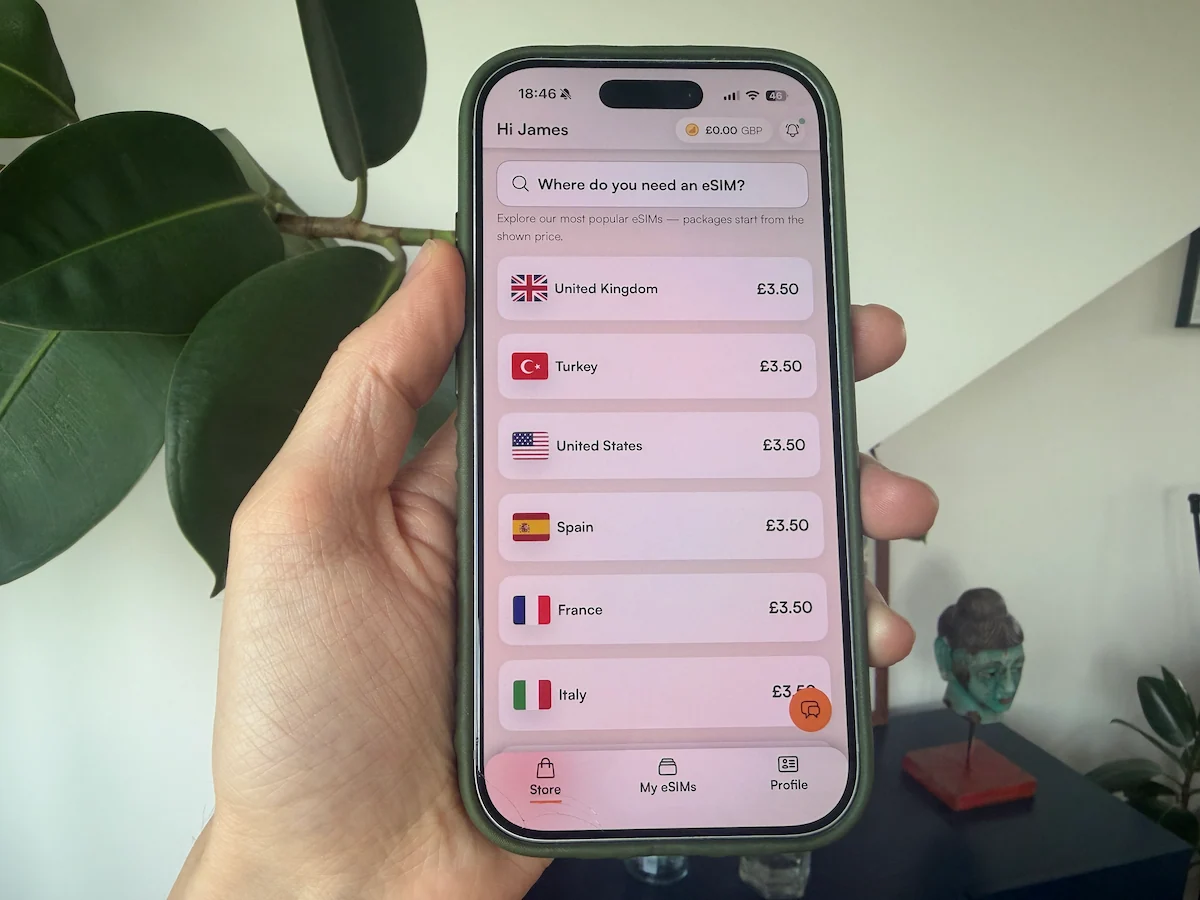
Airalo has a range of eSIM data plans, whether you’re visiting one country or multiple destinations.
Search in the app for the country you’re visiting, or a regional or global plan if you’re going to several countries.
You’ll see different data packages based on how much data you need and how long you’re staying.

Not sure how much data you need? It’s better to go slightly over. When you’re travelling, you’ll likely rely more on apps like maps that use a lot of data – and you won’t always have WiFi – so your data use will probably be higher than at home. That is unless you plan to stay at your hotel the whole time, then you probably won’t use that much!
Step 5: Purchase and install your eSIM
Purchase your eSIM
Once you’ve chosen your plan, buy it in the app and follow the installation steps provided. The app tells you what you need to do at each stage.
In this example, we’re going to show you the process of buying and activating a Greek eSIM.
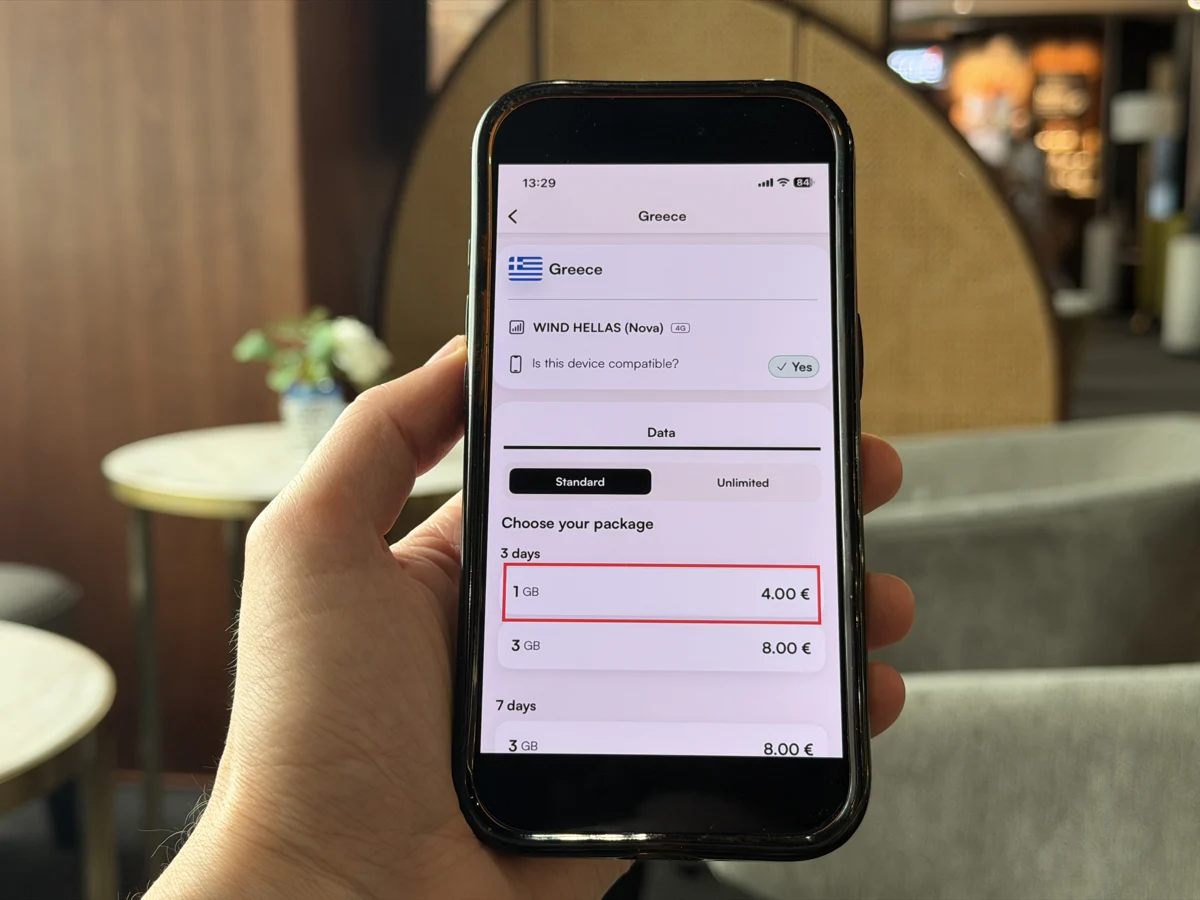
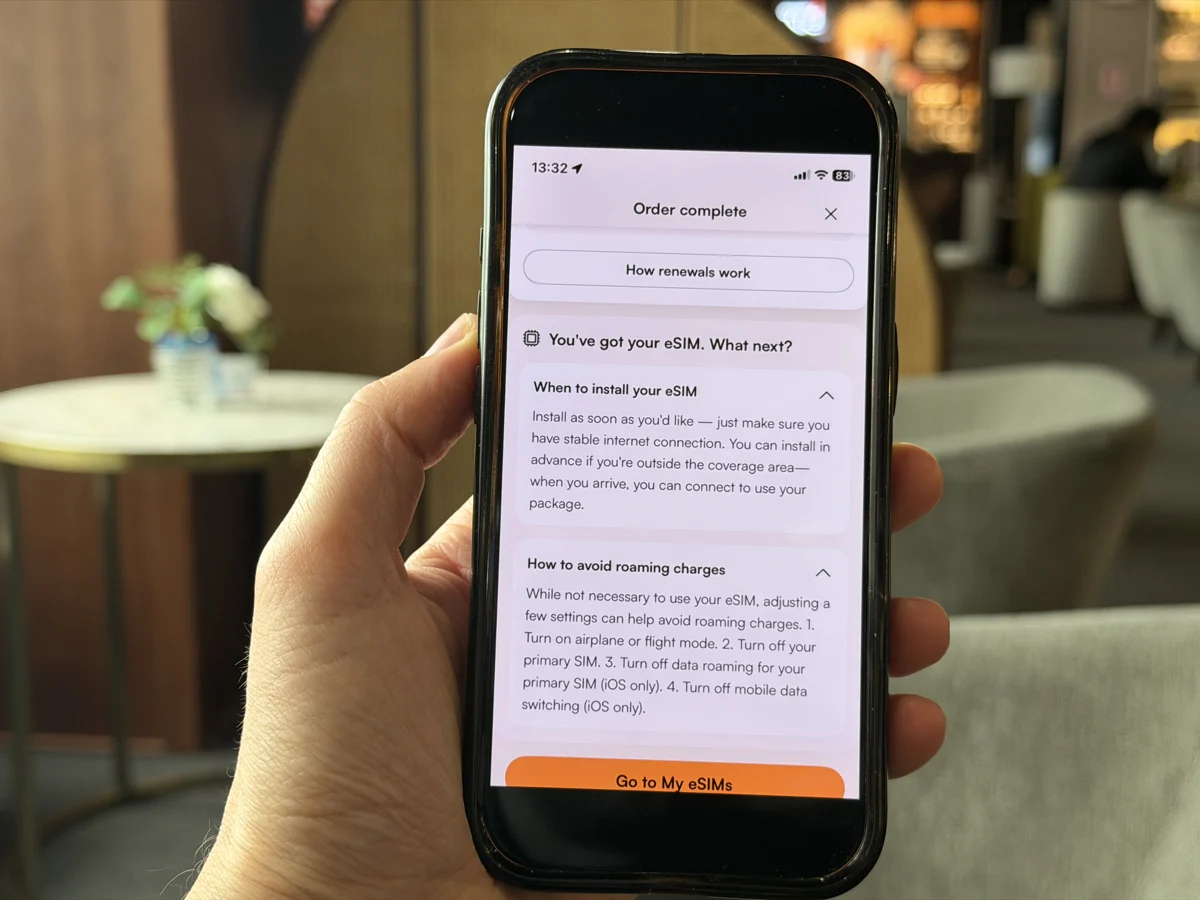
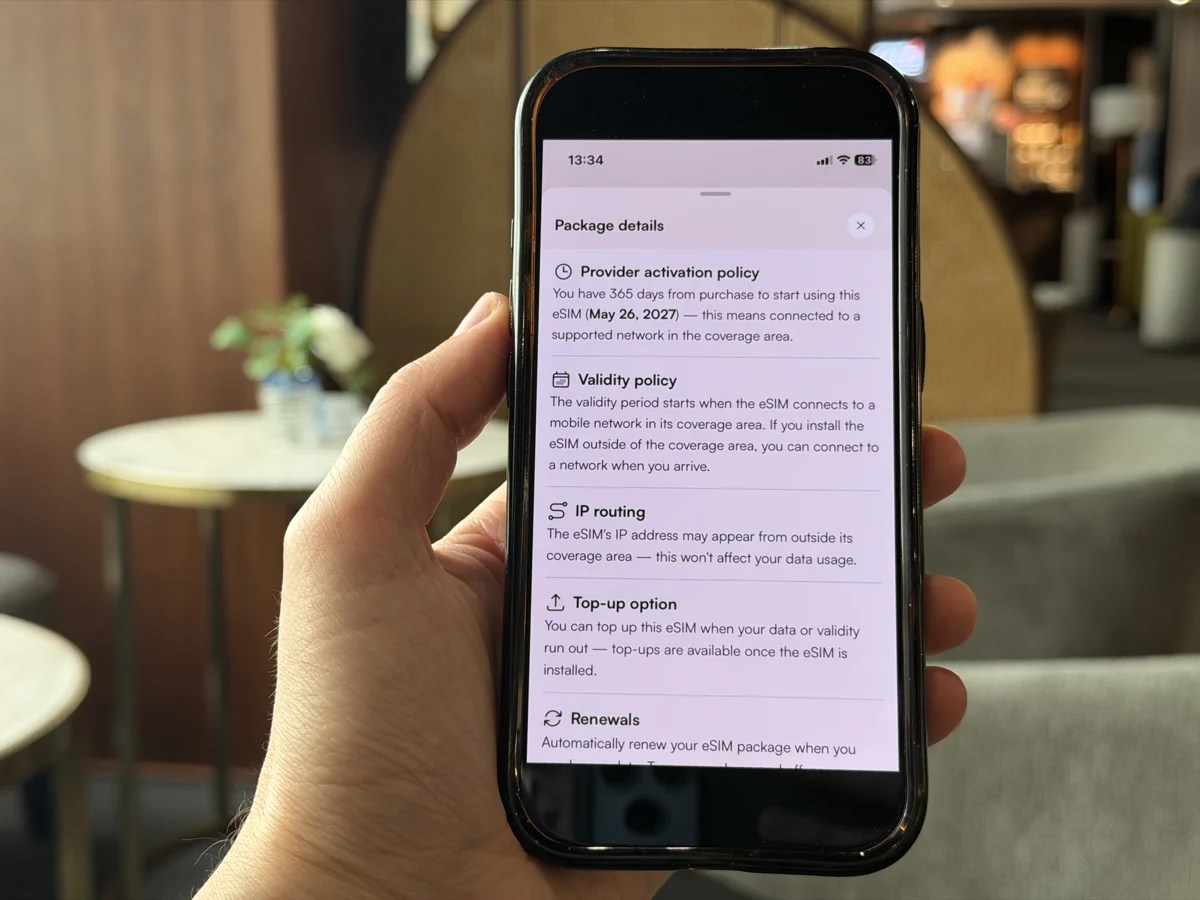
There are two types of eSIM, so before you install yours check which one you’ve bought:
- eSIMs that activate immediately upon installation
- eSIMs that activate when you connect to a local network at your destination
The type of eSIM it is depends on the specific plan, so your eSIM from Airalo could be one type or the other. Just check the validity of the eSIM you want in the Package Details section before you purchase.
Your eSIM activates immediately
If your eSIM activates as soon as it’s installed, it’s usually best to wait until you arrive at your destination before installing it. Otherwise, you could start using up your plan before your trip begins.
For example, if you’ve bought a 7-day plan for a 7-day trip to Thailand, installing it early could mean losing a day or two of coverage at the end of your trip.
Because you need a stable wifi connection to install, just keep in mind that you won’t have mobile data immediately when you land, so make sure you’ve saved any important details you might need offline – like your hotel address or transport info.
If your eSIM lasts longer than your trip, it’s usually easier to install it the day before you travel while you still have a stable internet connection.
Starting your plan a day or two early won’t matter if you’ve got enough validity left – and it makes things much simpler when you arrive, as you’ll only need to activate the eSIM rather than install it from scratch.
Your eSIM activates on arrival
If your eSIM only activates when it connects to a local network, then you should install it before you travel. This won’t start your plan early, and it means you’ll be able to connect to mobile data as soon as you land.
Install your eSIM
Installation is done through the Airalo app.
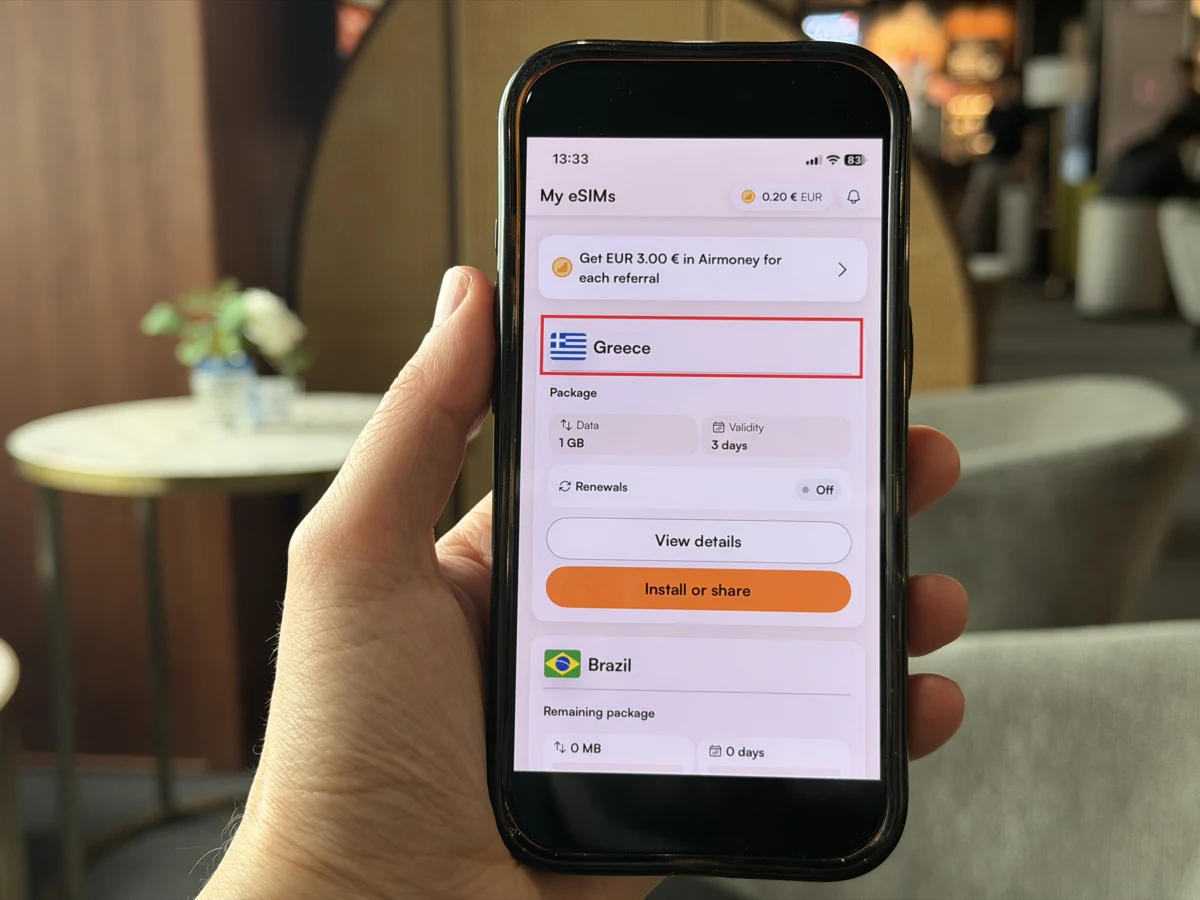
- Open the Airalo app, go to My eSIMs and choose the eSIM you want to install
- Tap Install or Share, and follow the on screen instructions
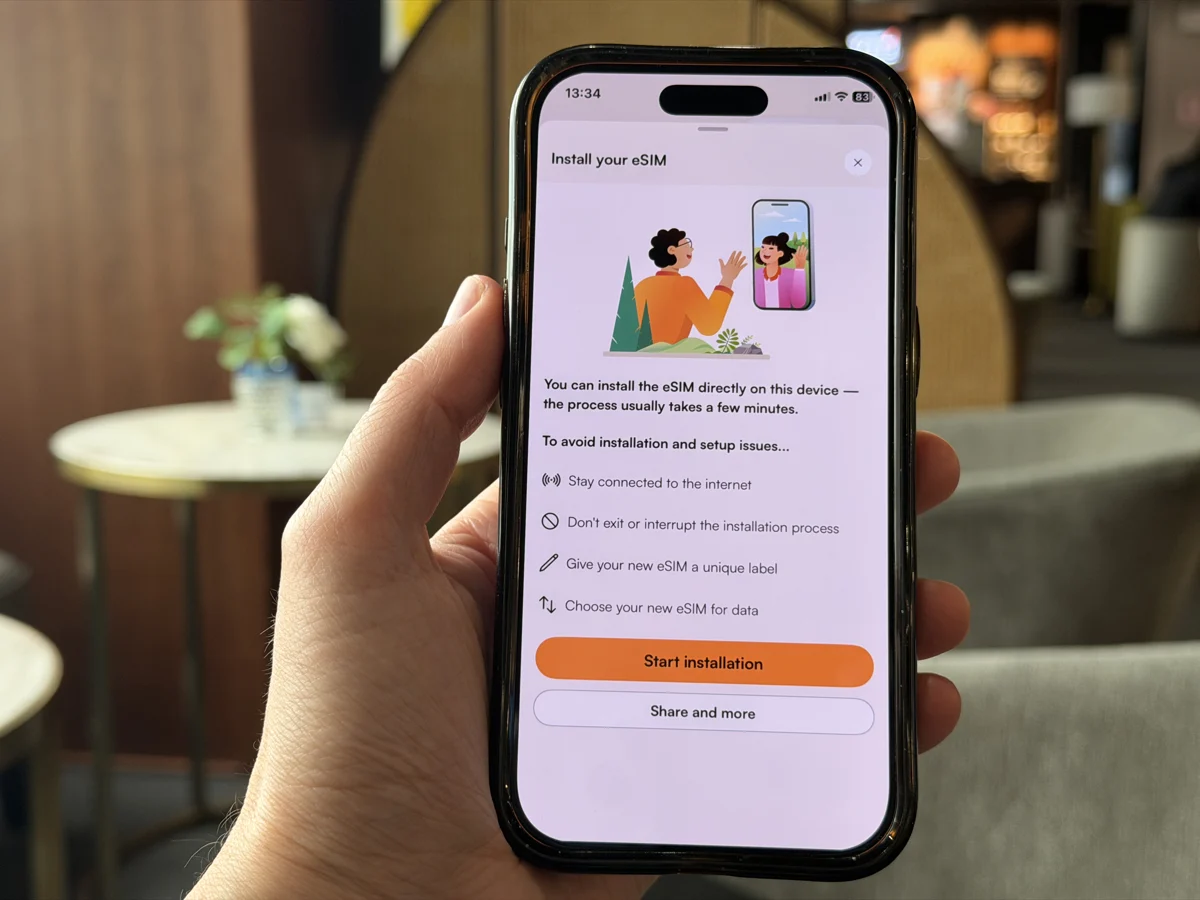
- It promps you that you are about to start the process and reminds you that you need an Internet connection throughout the process.

- Your eSIM is installed! This can take a few minutes to install.
You can find a step by step guide for Apple and Android phones here.
Before you fly or travel
Turn off data roaming and put your phone in airplane mode to make sure you don’t accidentally incur any charges you aren’t expecting.
Step 6: Use your Airalo eSIM once you arrive!
When you’re ready to connect your eSim, follow these steps.
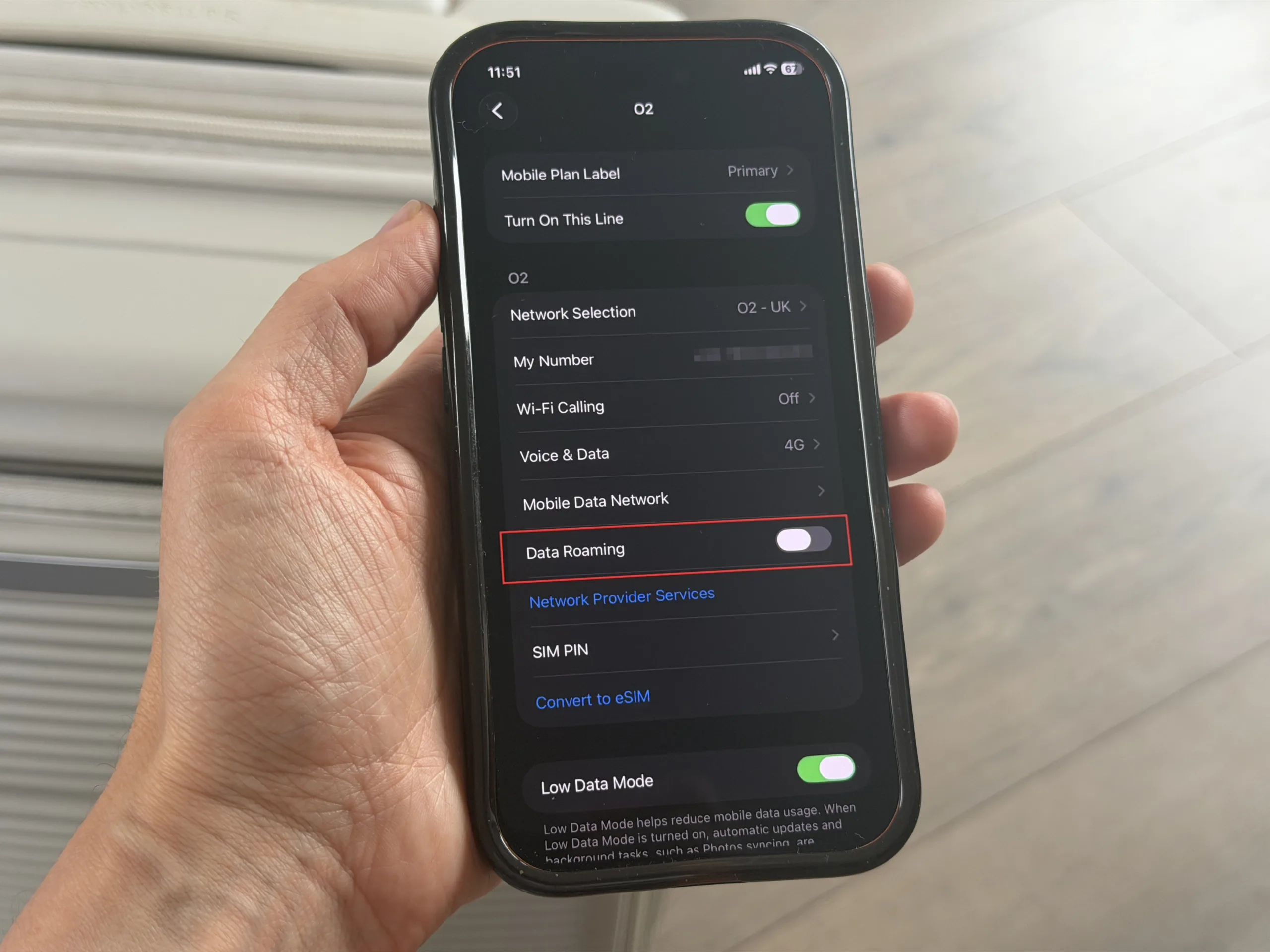
- Go to your device settings and turn off data roaming on your primary SIM, you don’t want to incur charges through your main provider.
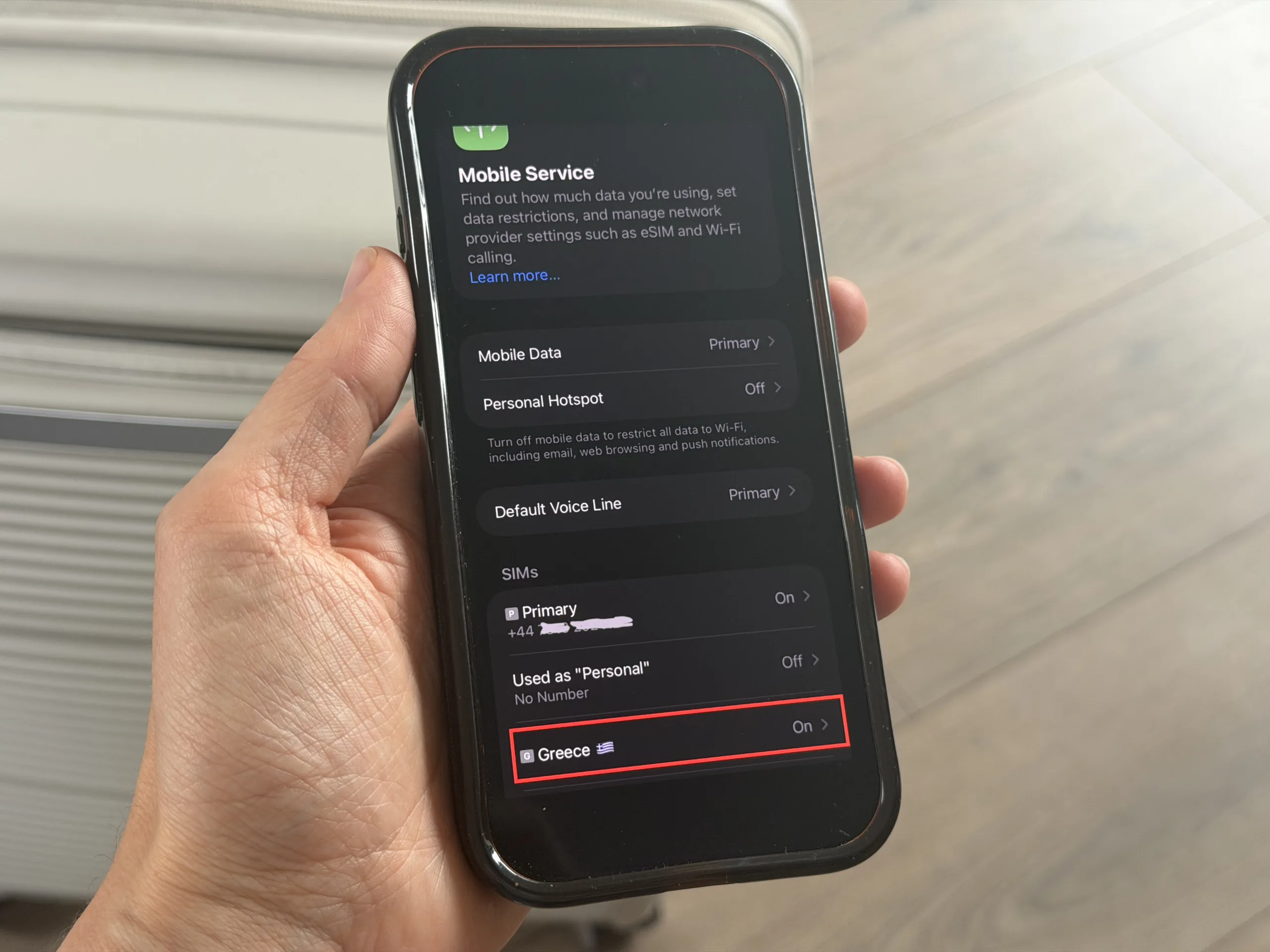
- Select the eSIM you want to use for mobile data for your trip
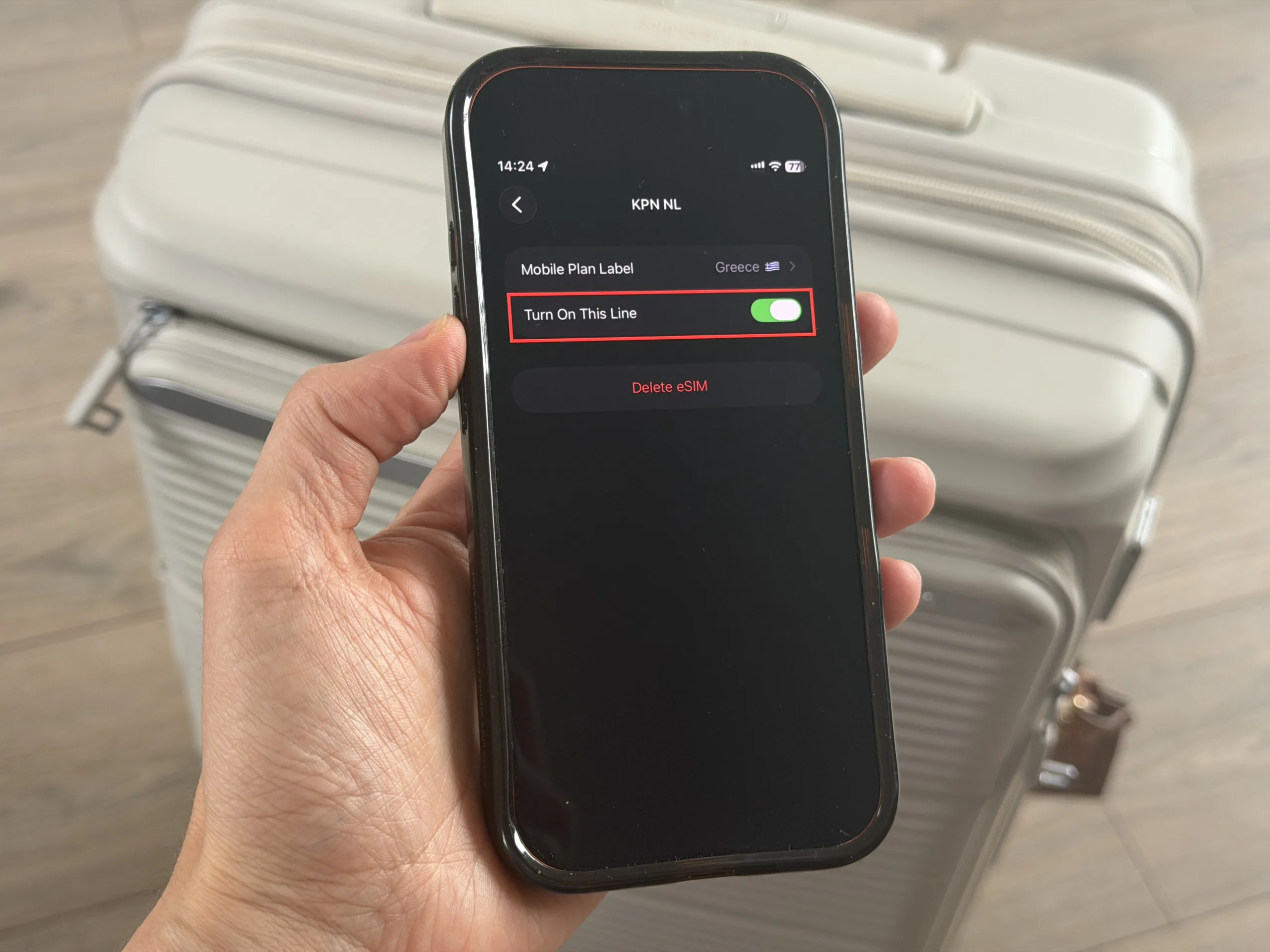
- Toggle Turn On This Line to ‘on’.
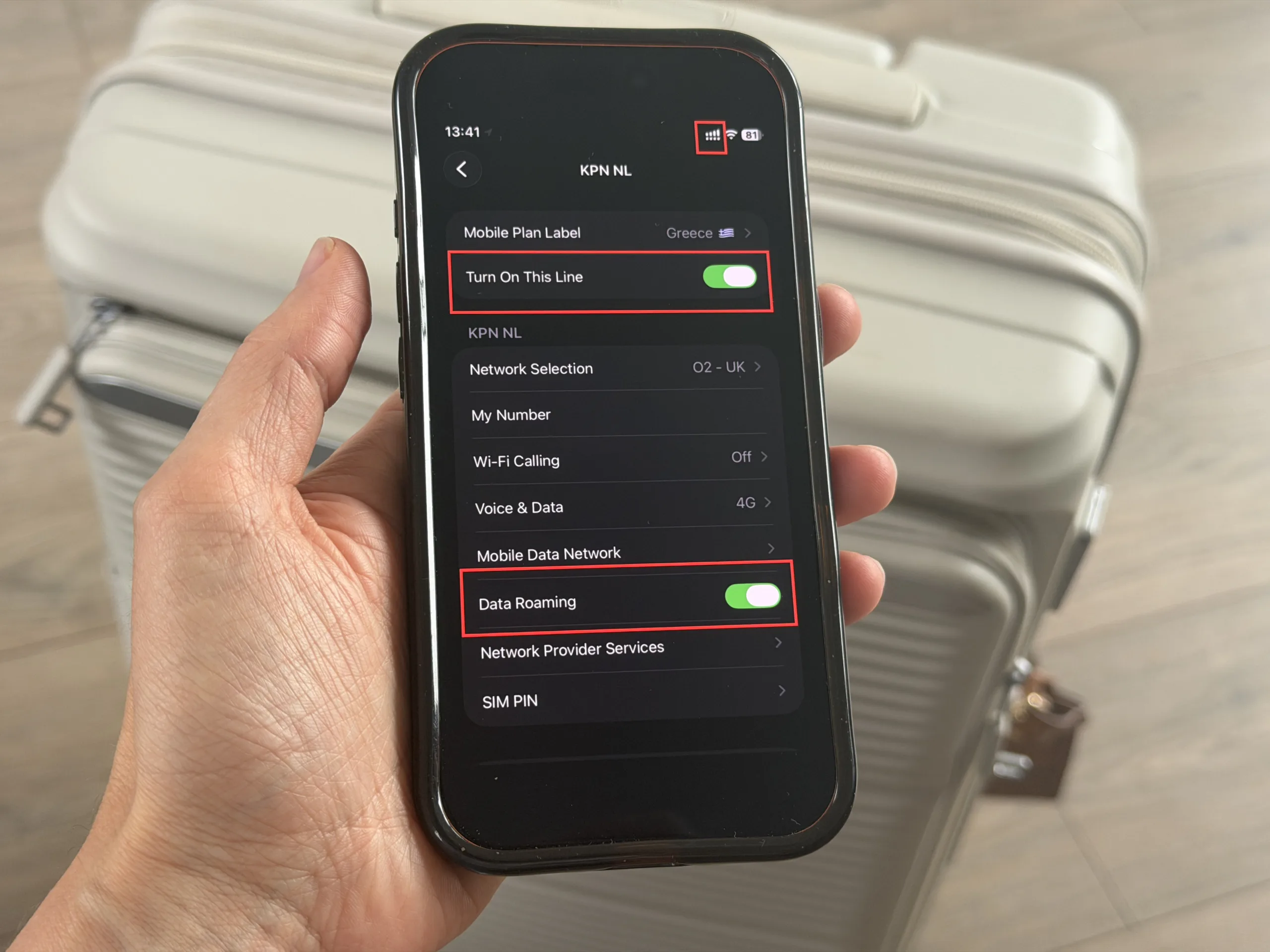
- You will see your signal bars appear like two layers – this means the eSIM is on.
- Once you’ve switched on Turn On This Line, you’ll see more options appear and you can toggle on data roaming for your eSIM.
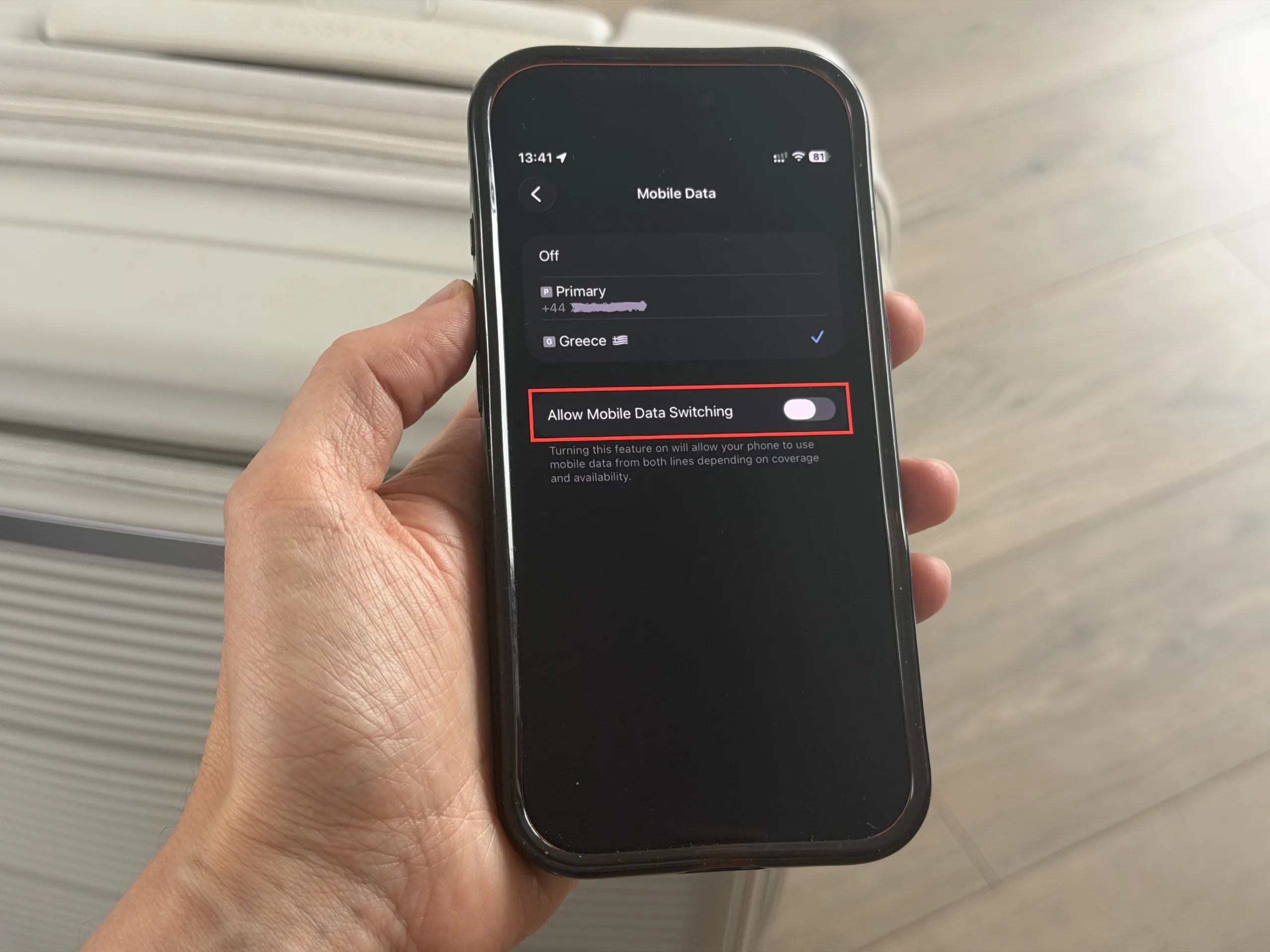
- Your phone should then connect to the internet and you can start using your local data!
- Turn off Mobile Data Switching to avoid charges on your main SIM
If it doesn’t work straight away, give it a minute or restart your phone – it can sometimes take a little time to connect, especially just after landing.
These screenshots show how the process looks on an iPhone – you can find a guide for Android phones here.
Step 7: Use your data!
Now you’re connected, you can use data as you normally would – for navigation, social media or just plain old scrolling!
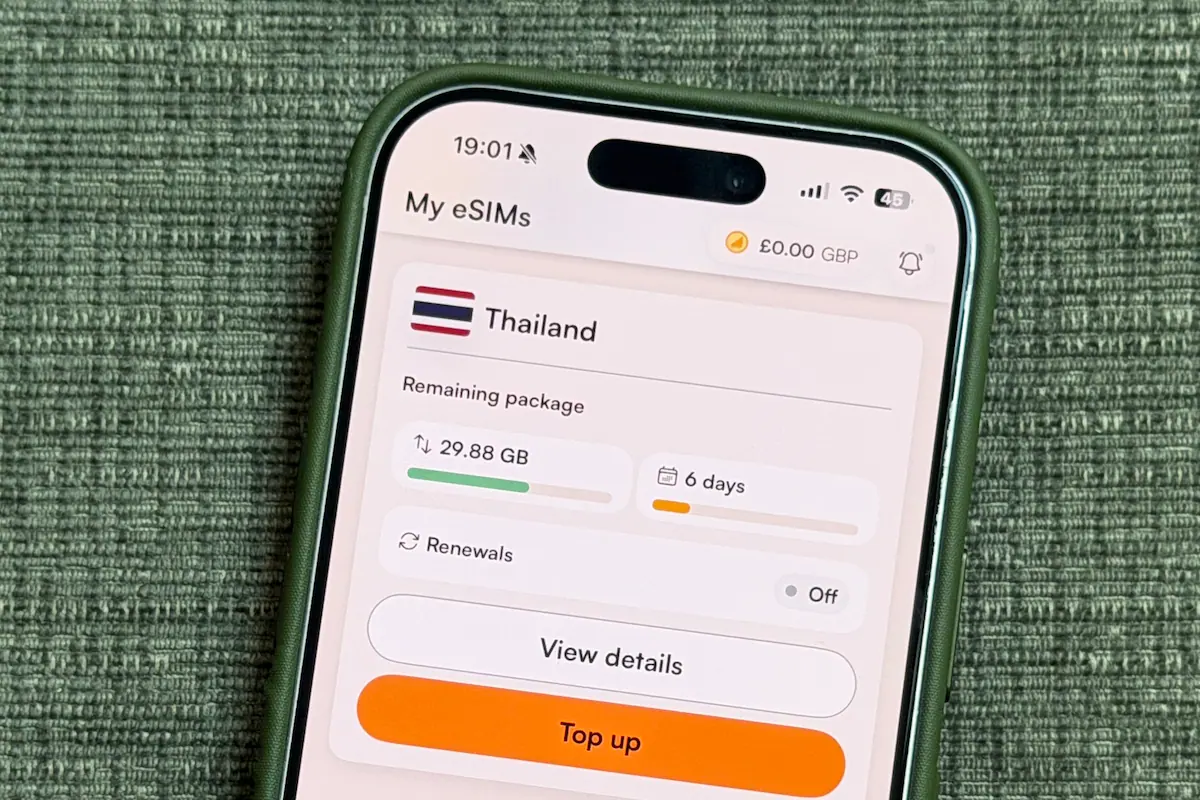
How do I know how much data I have used?
You can check how much data you’ve used in the Airalo app – it will show you how many days of validity you have and how much data too.
Can I buy more data?
It depends on the eSIM you’ve bought. If you can see a Top Up option in the eSIM you’ve bought in the Airalo app, then you can top it up. If you don’t see a top up button, or it doesn’t work, then you’ll need to download another eSIM to keep connected.
It’s a good idea to check before you purchase whether or not your eSIM is rechargable, if you think you might end up using all your data.
Do Airalo eSIMs include calls and texts?
Most Airalo eSIMs are data-only, so they don’t include local network calls or SMS. You can still make calls and send messages using data (through apps like Whatsapp) but if you want to have traditional calls and sms included, make sure you choose a package that has them.
Tips for using an Airalo eSIM abroad
- Set everything up before you travel so you’re not relying on airport wifi more than you have to. If your eSIM is one that only activates when you hit the local network, you can set it all up before you go.
- Keep an eye on your data usage in the app to avoid running into a situation where you’re stuck without data
- Save or screenshot important details, like your accommodation and transport tickets, just in case you can’t connect or there’s no data where you are (some countries/ areas can have patchier data than you’re used to back home).
FAQs About Using Airalo eSIMs
When should I install my eSIM?
It’s best to install your eSIM before you travel while you have a stable internet connection. Just check when your plan activates so you don’t lose any valid days.
Is Airalo cheaper than roaming?
In most cases, yes. Airalo eSIMs are much more affordable than standard roaming charges, especially for data usage abroad.
Can I use Airalo in multiple countries?
Yes, Airalo offers regional and global eSIM plans that cover multiple countries, which can be a convenient option if you’re visiting more than one destination.
Using Airalo eSIM for travel: Final Thoughts
Using Airalo is an easy way to stay connected and have the data you need when travelling abroad. It doesn’t take long to set up and it’s much cheaper than roaming. And let’s face it – it’s so helpful to be able to get online as soon as you arrive somewhere new, so you can stay on top of your itinerary and avoid unexpected costs.