Skyscanner is a go to website for many in search of a cheap flight, but whilst most people know how to do a simple search for a flight from A to B, many are missing out on some of the platforms super helpful hacks.
So, here’s seven of my favourite Skyscanner tricks, from the basic search tools all the way to the hidden hacks that can help save a fortune on your next trip.
What is Skyscanner?
Skyscanner is an online travel search engine that compiles the prices of flights, hotels, car hire and packages and pulls all the results into one place for you. They don’t sell any of those directly, but once you find the product you’re after, you click through to purchase.
This article may include mentions of products from one or more of our affiliate partners. Unless explicitly stated, we are not being paid to include these. To learn more about our advertising policy, please refer to our Terms of Service.
My Favourite Skyscanner Hacks

1. Search ‘Everywhere’ to Find the Cheapest Destinations
Let’s start with the basics and one of the reasons why so many people enjoy using Skyscanner. Perfect for when you fancy a trip but you don’t mind where you go, or you simply want to discover a new destination.
You pop in your departure airport, type in ‘everywhere’ as the destination, select your dates and let Skyscanner do the rest.
How to Use Skyscanner’s Everywhere Search
- Head to the Skyscanner homepage
- Under ‘From’, fill in your departure airport
- Under ‘To’, write ‘Everywhere’
- Select your dates – see below for when you’re flexible
- Add how many passengers there are
- Tick ‘Direct flights’ if that’s useful for you
- Hit ‘search’
Skyscanner will then list a load of flights by country from low to high. Don’t forget to use the filters to whittle down the results to what you actually want!


If you’re travelling short haul, I’d recommend hitting the ‘Direct flights’ option in either the initial search or the filters. As let’s be honest, a £30 return flight to Ireland via Spain probably isn’t anyone’s idea of a killer deal.
2. Use ‘Flexible Dates’ to find the cheapest flights in a month
If you have a destination in mind but simply want to find the cheapest flights going there, you can select entire months instead of specific dates.
How to Use Skyscanner’s Flexible Date Search
- Head to the Skyscanner homepage
- Under ‘From’, fill in your departure airport
- Under ‘To’, write your intended destination – or you could search ‘everywhere’
- Tap on ‘Depart’ and switch from ‘Specific dates’ to ‘Flexible dates’
- Select an entire month
- Repeat for your return date
- Hit apply
- Fill how many passengers there are
- Tick ‘Direct flights’ if that’s useful for you
- Hit ‘search’
Again, Skyscanner will list a load of flights by country from low to high but don’t forget to use the filters to help you find exactly what you’re looking for.
Can’t find the cheap price for yourself?
You’ve found a corker of a deal but when you click through, it displays a calendar of dates and you can’t seem to find the price it was displaying! I’ve had this issue before too, but there’s a couple of workarounds.
Switch from ‘Calendar’ view to ‘Chart’ view
Perhaps I’m just more of a visual learner, but I find it much clearer where the cheap flights are and when the return flights are in graph form.
Use the app
Which brings me onto hack number 3…
3. Use the app for suggested cheap trips
As well as their website, Skycanner has an app which works in a similar way but has a few extra tools that lots of people don’t know about.
Firstly, it gives you an added option when searching for flexible dates, allowing you to search ‘anytime’ which is great if you really don’t care where you want to go somewhere.
And whether you know the month you want to travel or not, it’s the search results that come up when you’re flexible that are so helpful as rather than simply presenting a calendar view, it presents a load of suggested cheap flights with the following categories:
- Cheapest flights
- Direct flights
- Weekend trips
- Long weekends
- 3-4 days
- 1 week
- 1+weeks
How to Use Skyscanner’s Suggested Dates App Search
- Download the Skyscanner app
- Tap on ‘Flights’
- Fill in your departure airport
- Fill in your destination – you can use everywhere here too
- Tap on the date box and and switch from ‘Specific dates’ to ‘Flexible dates’
- Select an entire month or ‘search anytime’
- Repeat for your return date
- Fill in how many passengers there are
- Tick ‘Direct flights’ if that’s useful for you
- Hit ‘search’
Again, this search will share a list of countries and prices from low to high. You can use the filters to try and get the results down, but otherwise just simply tap on a country you’re interested in. Next, it will bring up a list of destinations and prices from low to high.
In my case, this is Valencia and by tapping on this destination, it will bring up a list of suggested flights.
I personally find this more useful than the calendar view if I’m searching for return flights, as it allows me to quickly see what dates could work for my trip.
4. Search for flights from nearby airports

Know where you want to go and when but the price is just too much from your usual airport? Don’t worry, there are still options.
The first is to be open to other airports that you could leave from, and you can open up your search by selecting ‘Add nearby airports’ to either or both the departure and arrival airports.
How to Search Skyscanner from Nearby Airports
- Head to the Skyscanner Website – this isn’t available on the app!
- Fill in your departure and arrival airport
- Beneath either – or both – tick ‘Add nearby airports’
- Fill in the rest of your details
- Hit ‘search’
5. Search for flights from and and to entire countries
Still struggling? Well this is a good hack for when you have to be somewhere on a certain date, and you’re willing to get as close as possible to make it happen!
And very few people realise that you don’t have to be so specific with your departure and arrival airports. Instead, you can actually select entire countries.
So let’s say your friend is getting married abroad and you missed all the cheap flights from your local airport – whoops. Instead, you could search for ‘United Kingdom’ as your departure airport and travel to the cheapest departing airport instead.
Same goes for if the prices are too high at your intended destination. Just search to the whole country instead!
And of course, you could also search from and to two whole countries if you’re super flexible.
How to Search Skyscanner from and to entire countries
- Head to the Skyscanner Website or app – this works on both!
- For either or both the departure and arrival airport write the entire country instead – e.g. United Kingdom
- Fill in the rest of your details
- Hit ‘search’
6. Use the ‘flexible dates’ grid calendar to check you’ve got the best price
So you’ve found the flights you’re interested in, but now it’s time to check that there’s not any better deals.
For this, you can check the top of the search page to see other date suggestions.

However, the tool that’s more useful is this box at the end:

This brings up a grid which quickly shows you where the cheapest return flights are. It’s super useful!
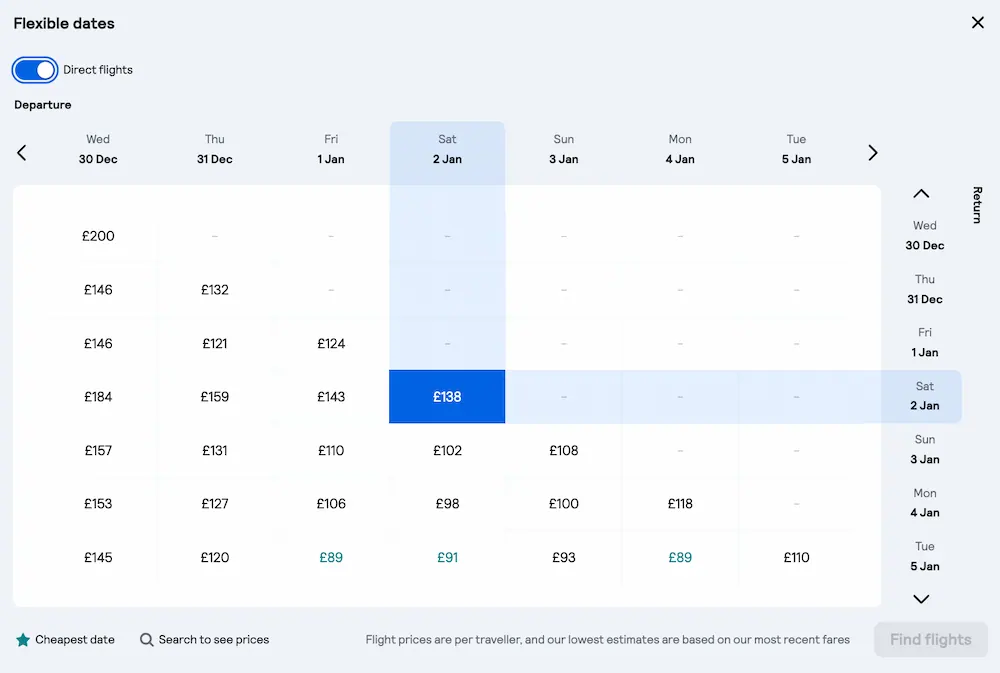
How to Search Skyscanner grid calendar
- Head to the Skyscanner website – sadly this one doesn’t work on the app
- Find the flight you’re interested in
- Look out for the ‘Flexible dates’ white box in the top right hand corner of the screen below the search boxes
- Use the grid to check you’ve got the best deal possible
7. Search for flights plus baggage cost

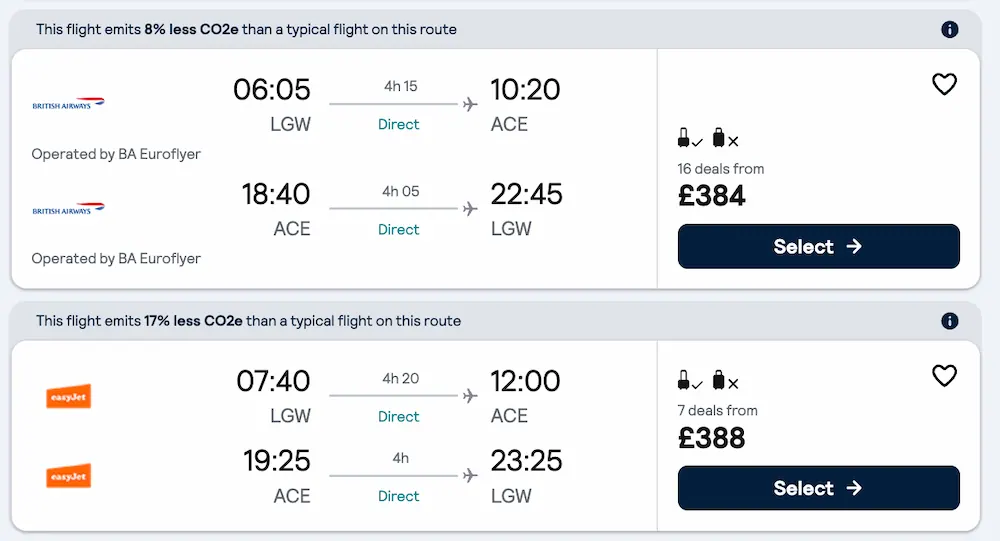
You’ve found your flight but are wanting to add luggage, which we all now could send the final costs spiralling. And here’s the thing, some airlines that may look like they cost more can end up being cheaper if you do need to add a bag or two.
Well good news, without having to click through to the airlines page, Skyscanner does have a tool to help you find out the total cost beforehand.
How to search for the flight plus baggage cost
- Head to the Skyscanner website or app
- Find the flight you’re interested in
- In the filters, look for ‘Baggage’ which allows you to select ‘Cabin Bag’ and/or ‘Checked Bag’
- After selecting, the price will update
A small cabin bag which goes underneath the set in front of you – which is free on all flights – is included in the price already. You do not need to select one of these options to get this.
Therefore, the ‘Cabin Bag’ option refers to the large cabin bag that goes in the overhead compartment. It’s the bag which is chargeable on airlines like Ryanair and easyJet, but not on British Airways.
That’s why an easyJet flight may look cheaper initially:
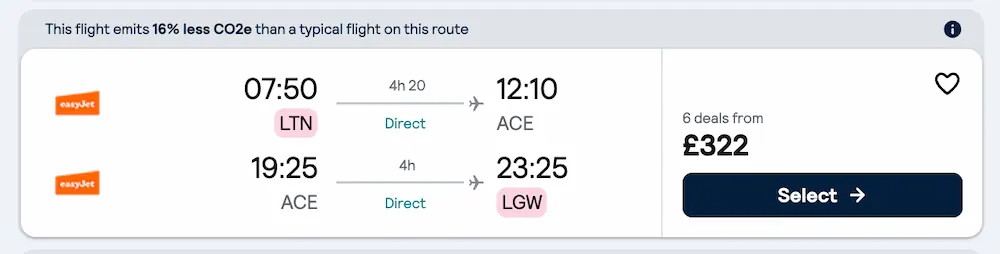
But after selecting ‘Cabin Bag’, another flight might actually work out better value for money:
There are new EU rules coming in in 2027 which will change how this works, as all airlines will have to display the price of a flight plus a small and large cabin bag as the first cost you see. However, I do hope that Skyscanner will then bring in an option for just the small cabin bag as as a light packer, that’s the price I’ll be most interested in!
8. Use Skyscanner Drops to Spot Big Price Drops
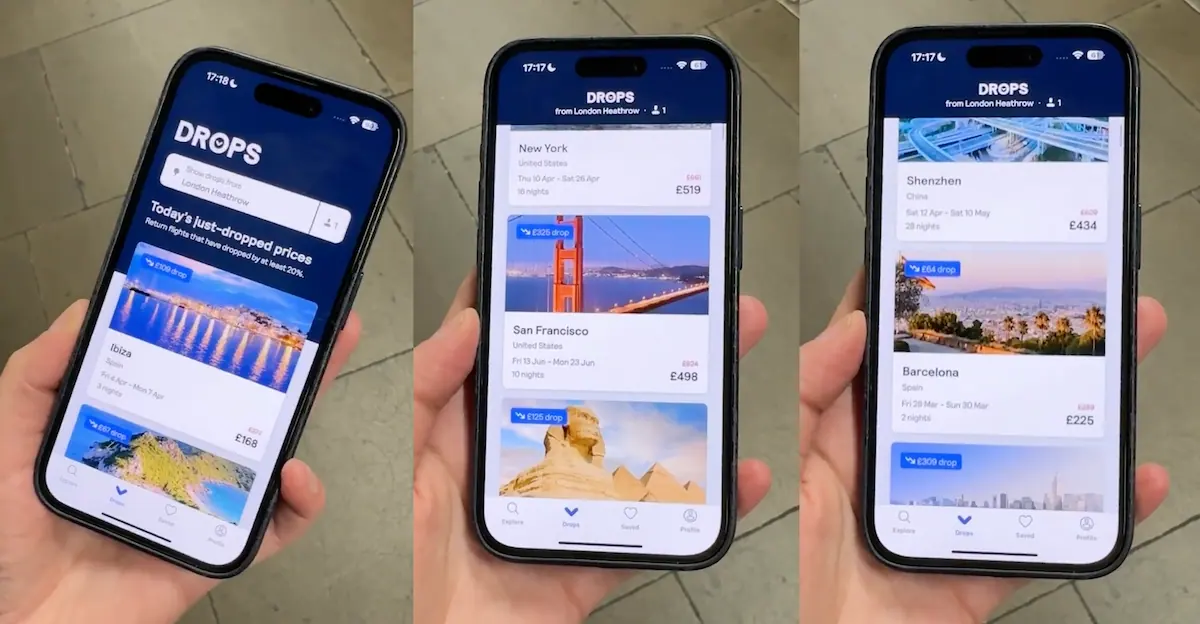
Drops is a fairly new addition to Skyscanner, and it’s great if just knowing you’ve got a good deal. Each day, it scans billions of flights to find which have dropped more than 20% in price.
They then compile this in a daily list for you to browse.
It’s really useful if you’re ready to book but are just after some inspiration.
How to use Skyscanner Drops
- Head to the Skyscanner app – yep this one is app only though you can sign up for Drops email updates!
- Tap on ‘Drops’ – it’s the second option on menu at the bottom
- Select your departure airport
- Add in what travellers you’re looking for
- Browse the top picks for you
- Scroll down to find today’s ‘just-dropped prices’
As the list changes every day, don’t forget to set a price alert (just tap the heart in the top right once you’ve clicked through for more flight info) for any you like the look of – it may not be there when you check back tomorrow!
My Final Tip for Finding Cheap Flights on Skyscanner
As you can see, there are loads of Skyscanner tools that can really help you find a cheap flight – you just have to know where to find them! However, the biggest hack of them all is… Being as flexible as possible!! That’s the one sure way to get the best price possible.
Happy deal hunting!